01What an operation is
An operation, in Poudra, is an outing of all your ready routes — those with an operator and stops. The Dispatch screen first tells you where you stand: “No operation in progress”, “Operation … in progress” or “An operation is waiting for your confirmation”. Then, under “What would go out”, it counts your ready routes, those without an operator and those without stops, with a link to Routes to fill in what is missing.
02Trigger
Give the operation a name (and, if you like, the expected accumulation). “Trigger and call out” asks for confirmation, then sends the routes out right away: each route becomes an outing and operators are called out on their phones (notification, text or email). Customers are not notified at that moment: they are when the truck approaches (see below). If no route is ready, the button is greyed out and the screen says why. “Only propose, confirm later” creates the operation without sending anything. The dispatcher can only propose: the owner confirms, dismisses and closes.
03When the customer is warned
The customer is notified when the truck approaches their place: at each stop checked in, the customers of the next stops get “shortly”, in their language, with the link to their tracking page — one notice per customer per operation. The number of stops ahead (1 to 5, two by default) is set in Settings › Customer notices. When the operator closes the visit, a second “done” notice goes out with the link to the photos; that one never goes by text, only by notification and email. In a building, occupants who agreed to it get “move your vehicle”. Nothing promises a time: the notice says “shortly”. And the first stop of a route may not be warned if the operator did not tap “On my way” before leaving: their first check-in warns the next stops, not that one.
04Quiet hours and the “on confirmation” mode
In Settings › Customer notices, “No texts at night” opens a window (for example 22:00 → 06:00, midnight included) during which the approach notice does not go out by text: notification and email only, and the message log says “quiet hours: text skipped”. The same screen keeps the previous mode, “As soon as the operation is confirmed”: a single notice, early, sent to every customer the moment you confirm. The screen shows the exact text the customer will receive, in French and in English.
05Proposed operations
A proposed operation — by hand, or by the weather if you follow a station — waits under “Proposed”. “Confirm: send the routes out” does exactly what the button says; “Dismiss” removes it without sending anything. One operation at a time: the next one can only be confirmed once the first is closed.
06Follow, reassign, close
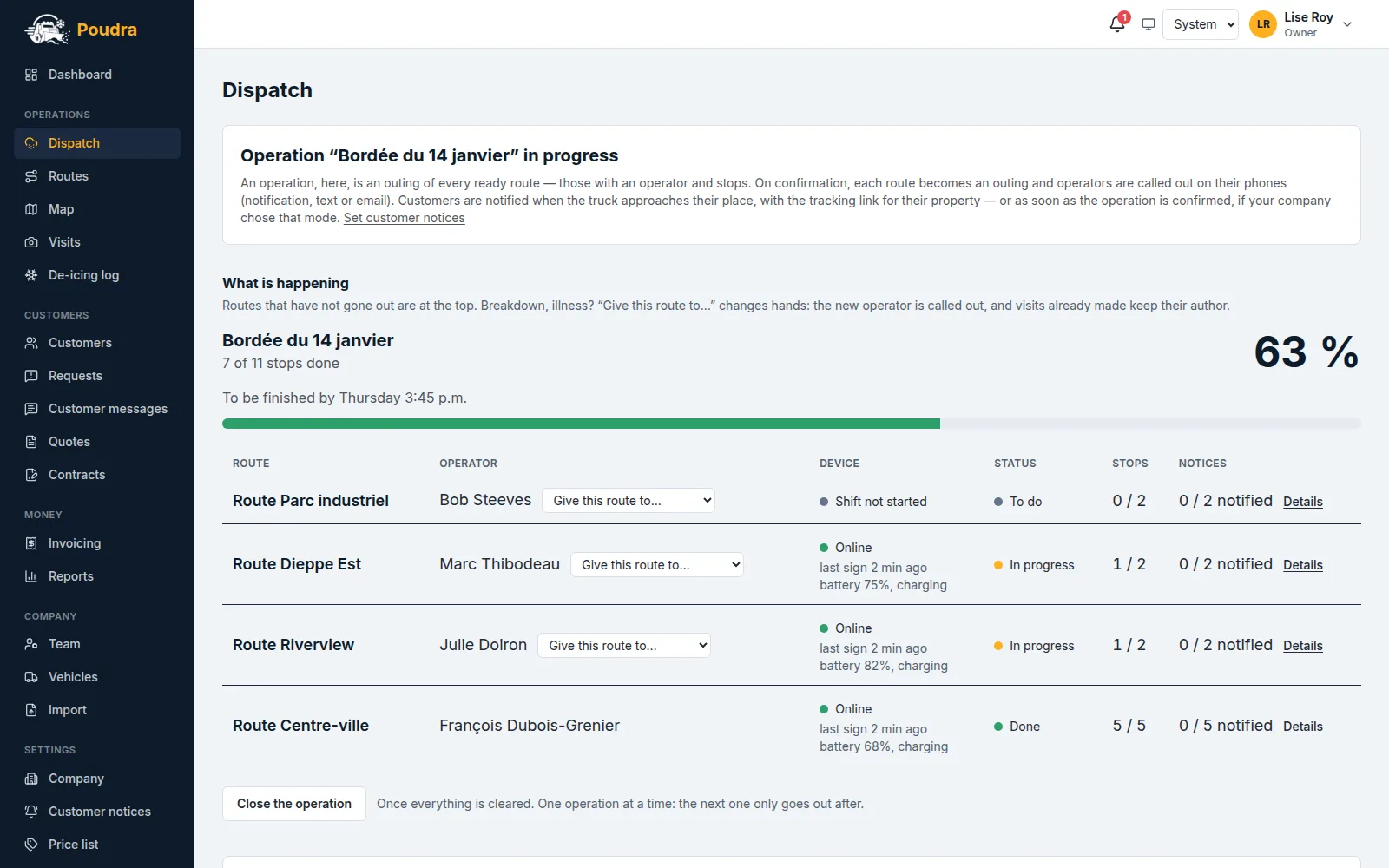
During the operation, “What is happening” updates on its own: stops done out of stops to do, and the deadline if you promised a delay — routes past it move to the top. Under the operator’s name, “Clients notified at 4:12 a.m.” says they tapped “I’m leaving” when leaving. The “Device” column shows what their phone is giving: online, quiet (5 minutes without news), or “no news” in red (15 minutes) — with its battery and what is wrong (location “while in use”, battery saver). Poudra never claims to know WHY: a tunnel, a closed app and a dead phone look the same. Their check-ins are not lost: they wait in the phone and go out when the signal returns. When a truck turns red, the owner and the dispatcher get a bell and a notification — once, and another when it comes back. On the map, each truck carries the age of its last point: a twelve-minute pin is not its current position. A truck broke down? “Give this route to…” hands it to another operator, who is called out; visits already made keep the name of whoever made them. Below the table, a map shows each stop: grey to do, amber under way, green done. When everything is cleared, “Close the operation”.
07Knowing who was warned
In the routes table, the “Notices” column counts the customers notified on the route’s stops (“3 / 12 notified”). “Details” unfolds the list of stops in run order, each with: “notified at 4:20 AM” in green, “not notified yet” in grey, “refused: …” in amber with the reason (no consent, unsubscribed, quiet hours, text quota, no main contact), or “failed” in red for a technical failure. That is what to open when a customer calls to say they got nothing — the “Customer messages” screen also keeps every message, approach notices, visit done notices and reports sent to the customer included. On the same line, “2 reports” in amber says the operators flagged something on that route; once unfolded, each stop concerned carries one pill per report — vehicle not moved, obstacle, access blocked, damage, hazard, other — amber when the customer received it, grey and marked “internal” otherwise. A customer who disputes a visit writes from their tracking page: the request lands in Requests, with the proof alongside.
08The proof file
A visit’s proof file now carries the weather observed by the closest Environment Canada station at the time of the visit (the observation time and the gap are written; beyond 90 minutes, the file says “unavailable” rather than a far-off value), the truck’s path around the visit (drawn; over satellite imagery if Mapbox is configured; the list of points with their accuracy; “no trace” if the shift was not open) and the reports with their photos. The visit page, in the office, shows the same weather and the same reports, each with its photos and “sent to the customer” or “internal”.
09The automatic trigger, optional
At the bottom of the screen, you can follow an Environment Canada station: Poudra reads the forecast every hour and proposes an operation as soon as the forecast snow reaches your threshold, and emails you. Nothing goes out until you confirm: no call-out, no customer notice.
10Truck traces
When an operator taps “Start the shift” on their phone, the app records their position for as long as the shift lasts, even with the phone in a pocket. On the Dispatch map, each truck on shift draws its path in a colour that stays its own, and a circle marks its last point: that is where it is. Below the map, the legend gives the operator’s name and the time of that last point, in your company’s time zone. Off shift, nothing is recorded: an operator who tapped “End the shift” is not tracked at home. A trace is never corrected or erased: it is evidence, and stays exactly as the phone sent it.
11A customer wants no more notices
Every email ends with an unsubscribe link, every text with “STOP”. A customer who uses it gets no more notices or reminders; their contracts and invoices do not change. If a customer tells you they no longer get anything, open “Customer messages”: every message is listed, with “not sent — the customer unsubscribed” where that applies. It is not a failure.